
TradingView is one of the best charting tools out there.
But here’s the problem most beginners hit:
👉 You can analyze… but you can’t trade directly
And that’s where everything breaks.
You see a setup → you switch platforms → you miss the entry → you hesitate → you lose confidence.
That gap between analysis and execution is where most beginners struggle.
👉 The solution?
Use a broker that works directly with TradingView.
Why You Need a Broker That Works with TradingView
Let’s be clear:
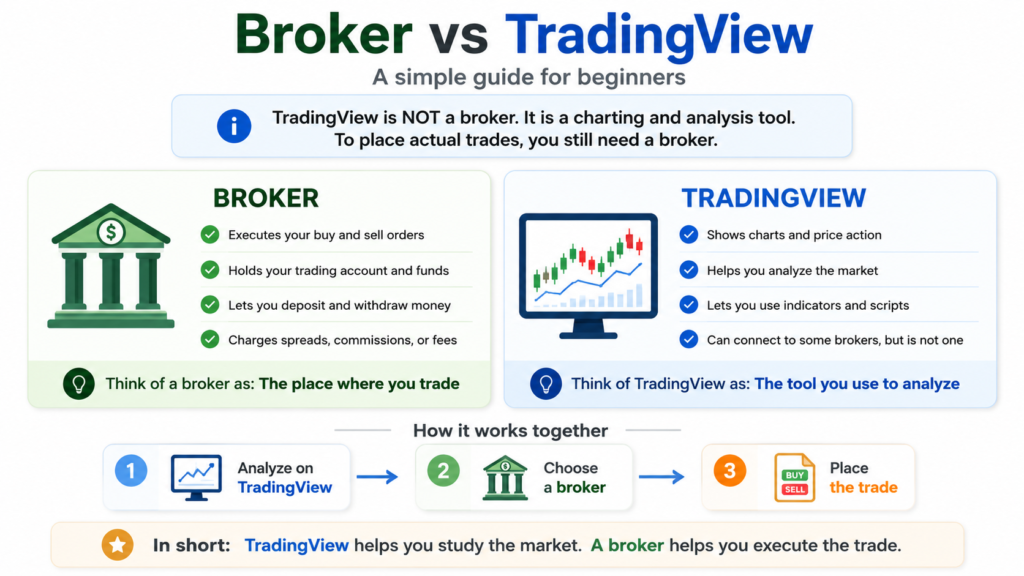
👉 TradingView is NOT a broker
It’s a charting and analysis tool.
To actually place trades, you need a broker.
The problem with using separate platforms:
- you switch between TradingView and MT4/MT5
- you lose speed
- you miss entries
- your execution becomes inconsistent
👉 When you use a broker integrated with TradingView:
- you analyze and trade in one place
- execution is faster
- workflow is smoother
- decision-making improves
👉 This alone can significantly improve your trading consistency.
Best Brokers That Work with TradingView (Top Picks)
Here are the best brokers that integrate well with TradingView and are suitable for beginners.
1. IC Markets — Best ECN Broker for TradingView (Forex Majors)
IC Markets integrates with TradingView and offers raw ECN execution — making it the strongest choice for traders who do their analysis on TradingView and need clean, fast execution on the other side.
Why it works well for TradingView users
– Direct TradingView integration via cTrader
– Raw spread from 0.0 pips on major pairs
– Reliable execution during London and NY sessions
– Transparent overnight swap rates — important for swing traders holding positions past rollover
Best for:
– Swing traders on forex majors
– Traders who run custom analysis on TradingView and need consistent execution
– Anyone doing 15–30 trades/month on EUR/USD,GBP/USD, USD/JPY
**Regulation:** ASIC (Australia) + CySEC (Cyprus)
**Minimum deposit:** $200
**Platforms:** cTrader, MT4, MT5 — all integrate with TradingView
Important note:
IC Markets Global is regulated by the Seychelles FSA (not FCA), so always check your region and entity.
2. OANDA — Best Overall TradingView Broker for Beginners
OANDA is one of the most beginner-friendly brokers that integrates with TradingView.
It is regulated in major jurisdictions including the US (CFTC/NFA) and UK (FCA), making it one of the safest options for new traders.
Why OANDA works well with TradingView:
- Direct integration with TradingView
- Clean execution
- Beginner-friendly interface
- No minimum deposit (in many regions)
Best for:
- beginners
- low capital traders
- simple setup
👉 Start trading with OANDA on TradingView
3. Pepperstone — Best for MT4/MT5 + TradingView Users
Pepperstone is one of the most flexible brokers available.
It supports:
- TradingView
- MT4
- MT5
- cTrader
Why traders choose Pepperstone:
- fast execution
- low spreads
- strong platform support
- regulated by FCA and ASIC
Best for:
- traders who want flexibility
- those using multiple platforms
👉 Connect Pepperstone to TradingView
4. FOREX.com — Best for US Traders Using TradingView
FOREX.com is one of the few brokers that works well in the US market.
It is regulated by:
- CFTC
- NFA
- FCA (UK entity)
Why it’s a strong choice:
- reliable execution
- strong regulation
- supports TradingView
Best for:
- US-based traders
- traders who want compliance and safety
👉 Start with FOREX.com on TradingView
Best for:
- cost-focused traders
- more active users
How to Connect a Broker to TradingView
Connecting a broker is simple:
- Open TradingView
- Go to Trading Panel
- Select your broker
- Log in
- Start trading
👉 Once connected, you can trade directly from the chart.
Which Broker Should You Choose?
If you’re unsure, here’s the simplest way to decide:
- 👉 Start with OANDA → easiest and safest for beginners
- 👉 Choose Pepperstone → if you want flexibility
- 👉 Use FOREX.com → if you are in the US
- 👉 Try IC Markets → if you want low spreads
👉 Most beginners should start simple.
Switch later only if needed.
Common Mistakes When Using TradingView with Brokers
- using different platforms for analysis and execution
- choosing a broker without integration
- ignoring regulation
- focusing only on spreads
👉 The biggest mistake?
Using a great tool (TradingView)… with the wrong broker.
Final Verdict
TradingView alone is not enough.
👉 You need a broker to turn analysis into execution.
The best setup is simple:
- TradingView → for analysis
- Broker → for execution
👉 Combine both correctly, and your trading becomes:
- faster
- cleaner
- more consistent
👉 Start with a trusted TradingView-compatible broker:
- OANDA
- Pepperstone
- FOREX.com
FAQ
Can I trade directly on TradingView?
Yes, but only with supported brokers.
Which brokers connect to TradingView?
OANDA, Pepperstone, FOREX.com, IC Markets, and others.
Is TradingView enough for trading?
No — you still need a broker.