
Best MT4 Forex Brokers 2026: Ranked by Execution, Spreads & Reliability
Twenty years ago, MetaTrader 4 launched and changed retail forex trading forever. Since then, brokers have released newer platforms, MetaQuotes built MT5, and dozens of alternative interfaces have competed for trader attention. Not one of them displaced MT4 as the standard.
Today, in 2026, MetaTrader 4 still runs on millions of trading desks worldwide. The reason isn’t nostalgia. It’s the ecosystem: two decades of Expert Advisors written in MQL4, thousands of custom indicators, a backtesting environment every algo trader knows inside and out, and a workflow that experienced traders have refined into muscle memory.
The problem is that “MT4 support” has become a meaningless marketing label. Every broker on earth claims it. What they don’t tell you is that broker A executes your MT4 orders at 0.0 pips average on EUR/USD, while broker B — running the same MT4 interface — fills you at 2.0 pips with occasional requotes on news. Same platform. Completely different experience.
This guide ranks the best forex MT4 brokers by what actually matters: execution quality, spread structure, EA permissions, VPS availability, and suitability for your specific trading approach.
Why is MT4 still the most important trading platform in 2026?
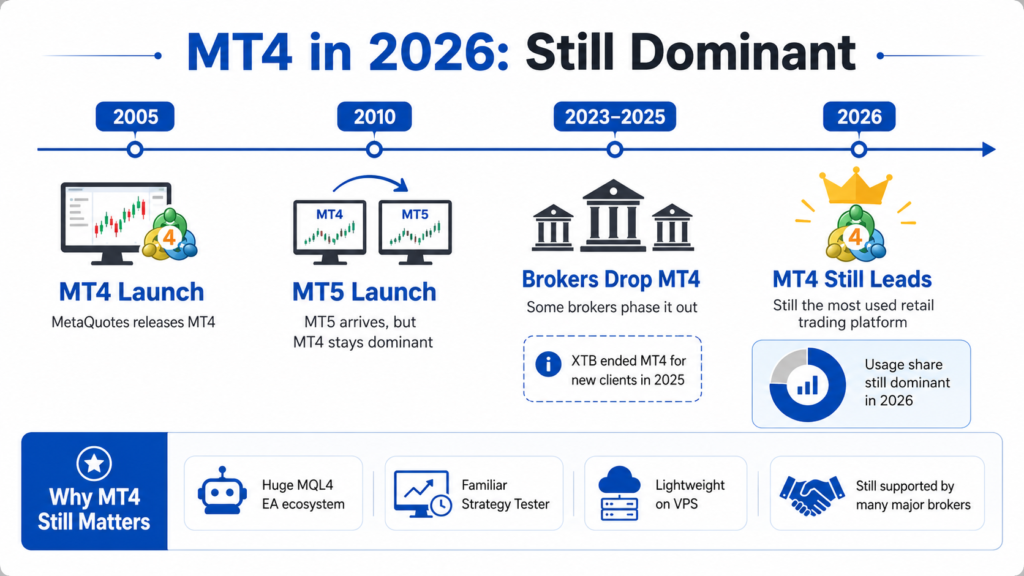
MetaTrader 4 was built by MetaQuotes Software and released in 2005. It became the industry standard within three years. MetaQuotes launched MT5 in 2010 — and for the past 16 years, MT4 has refused to die.
The reason is straightforward: the MQL4 ecosystem.
MQL4 is the programming language MT4 runs on. Over two decades, the global trading community has produced hundreds of thousands of Expert Advisors, custom indicators, and scripts in MQL4. The MQL5 community marketplace — MT5’s equivalent — has grown substantially, but the MQL4 library still represents an unmatched depth of tested, validated trading tools.
For a trader with an EA library built in MQL4, switching to MT5 means either paying someone to recode every algorithm in MQL5 or abandoning strategies that may have taken years to develop. That’s not a trivial decision.
MT4 also has structural advantages for certain trader types:
- One-click trading — MT4’s execution flow is faster for discretionary traders who know the interface
- Strategy Tester — MT4’s backtesting environment is familiar and documented across thousands of tutorials
- Lighter resource footprint — MT4 runs efficiently on older hardware and low-latency VPS configurations
- Broker accessibility — despite some brokers phasing out MT4 (XTB discontinued it for new clients in 2025), the majority of major regulated brokers still maintain full MT4 support
MT4 is not the future of trading infrastructure. MT5 offers more asset classes, more order types, and better native scripting architecture. But MT4 is still very much the present — and it will remain relevant as long as the MQL4 EA ecosystem remains the standard for retail algorithmic traders.
What makes a MetaTrader 4 broker actually good — not just compatible?
This is the question every MT4 broker list avoids answering. They show you a table of brokers with a checkmark in the “MT4” column and leave it at that. The checkmark is meaningless. Here’s what matters:
1. Server infrastructure and uptime
MT4 connects to your broker’s server for every price quote and order execution. A broker running MT4 on underpowered or overcrowded servers produces price feed delays, connection drops during high-volatility events, and fills that differ from what you saw at order placement. The best MT4 forex brokers run dedicated MT4 server infrastructure — sometimes co-located in Equinix data centers in New York (NY4/NY5) or London (LD4) to minimize latency.
2. Execution model (NDD vs dealing desk)
A broker running MT4 on a No Dealing Desk (NDD) model routes your orders to liquidity providers without human intervention. A dealing desk broker sits between you and the market — theoretically creating a conflict of interest on every trade. For MT4 users trading with EAs or scalping, NDD execution is the critical distinction.
3. Spread and commission structure on MT4
A broker can offer MT4 with a Standard account (spread embedded, no commission) or a Raw/ECN account (raw spread near zero + commission per lot). For high-frequency traders and EA users, the Raw account at a quality broker is substantially cheaper than the Standard account at a “cheaper” broker. Always calculate the all-in cost (spread + commission) rather than comparing headline numbers.
4. EA and scalping permissions
Some brokers technically support MT4 but prohibit specific trading behaviors: scalping within a defined minimum hold time, latency arbitrage detection systems that penalize fast EAs, or restrictions on news trading. Before deploying any EA, read the broker’s terms of service in full and get confirmation on your specific strategy type.
5. Smart Trader Tools and MT4 add-ons
MT4’s native functionality, while powerful, is dated. Brokers like Pepperstone enhance MT4 with Smart Trader Tools — a suite of add-ons including Trade Terminal (advanced order management), Correlation Matrix (multi-instrument analysis), and Mini Terminal (quick trade execution). These tools substantially extend MT4’s native capabilities without requiring you to switch platforms.
6. VPS hosting quality and availability
EA traders need 24/5 uninterrupted execution. A VPS (Virtual Private Server) keeps your MT4 running even when your personal computer is off. The best MT4 brokers offer free VPS hosting for qualifying accounts — typically above a minimum equity threshold or monthly trading volume.
Which are the best MT4 forex brokers right now?
The following brokers represent the strongest MT4 implementations available in 2026. Each is evaluated on execution quality, spread structure, EA/scalping permissions, and regulatory standing — not just the presence of an MT4 download link.
Which MT4 broker has the lowest spread for forex trading?
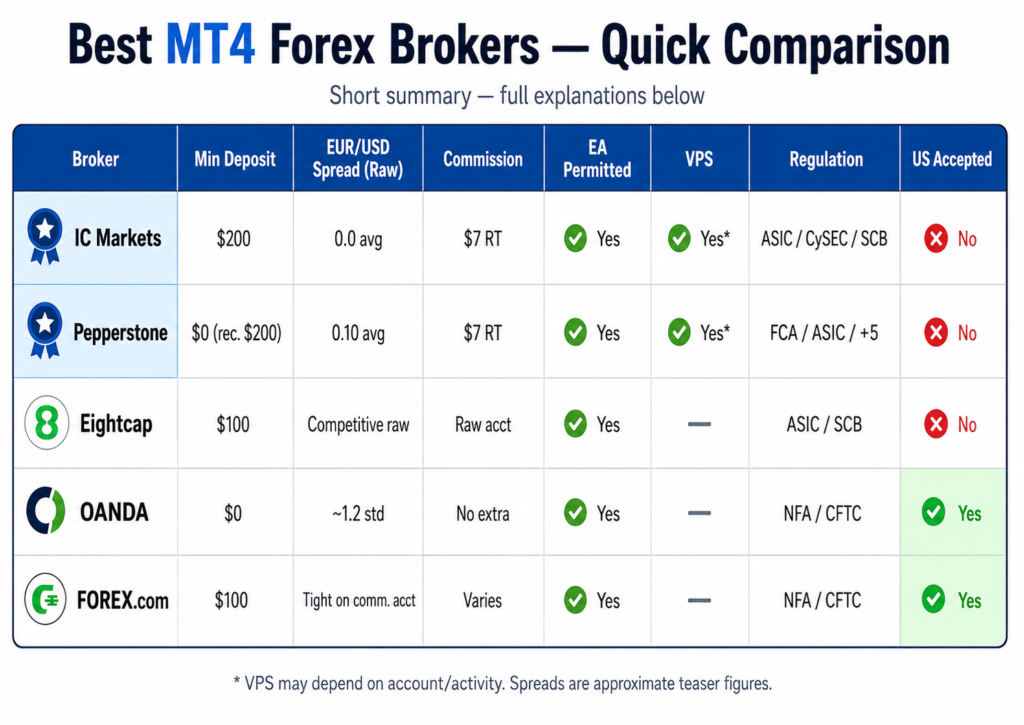
IC Markets delivers the tightest average spreads on MT4 of any broker in this category. Their Raw Spread account averages 0.0 pips on EUR/USD with a $7 round-trip commission per standard lot. The effective cost of a EUR/USD trade at IC Markets is approximately 0.70 pips total — competitive with any institutional-grade pricing available to retail traders.
IC Markets operates MT4 on servers co-located in the Equinix NY4 and LD4 data centers, placing their pricing engine physically close to major liquidity providers. The result is execution speed measured in milliseconds, not seconds — meaningful for EA traders whose strategies depend on rapid order fills.
Minimum deposit is $200. IC Markets supports MT4, MT5, and cTrader — giving traders optionality without forcing a platform switch. The broker is regulated by ASIC, CySEC, and SCB. US traders are not accepted. Open account here
Pepperstone is the closest competitor to IC Markets on MT4 spread quality. Their Razor account averages approximately 0.10 pips on EUR/USD with a $7 round-trip commission. The effective total cost sits at roughly 0.77 pips — marginally above IC Markets but within a range that only matters at very high trading volume.
Pepperstone’s MT4 implementation includes Smart Trader Tools — the most comprehensive MT4 add-on suite available at any broker. Trade Terminal, Correlation Matrix, Alarm Manager, and Mini Terminal extend MT4’s functionality significantly for discretionary and systematic traders alike. Pepperstone is regulated by ASIC, FCA, BaFin, CySEC, DFSA, CMA, and SCB — the broadest multi-jurisdiction regulatory profile of any broker on this list.
Which is the best MT4 broker for EA and automated trading?
Pepperstone is the best MT4 broker for Expert Advisor deployment, for three reasons.
First, Smart Trader Tools. The Pepperstone MT4 environment includes add-ons that go beyond what the native MT4 interface supports — including professional-grade order management via Trade Terminal and multi-chart correlation analysis that EA traders use for portfolio monitoring.
Second, free VPS hosting. Pepperstone provides free virtual private server access for qualifying accounts, with the server co-located close to their pricing infrastructure. For EA traders, a broker-provided VPS eliminates the setup friction of a third-party VPS service and reduces latency by keeping the EA on hardware physically proximate to the order execution system.
Third, explicit EA permission. Pepperstone’s terms of service explicitly permit Expert Advisors — including trend-following, mean-reversion, and news-reaction systems. The prohibited categories are clearly defined (latency arbitrage, tick scalping exploiting data feed irregularities) — giving EA traders a clear compliance framework rather than vague language that creates payout disputes later.
IC Markets is the second-best MT4 broker for EA trading. EA support is full, scalping is permitted, and the ultra-low spread environment is optimal for high-frequency strategies. IC Markets also provides VPS hosting for qualifying accounts. The difference from Pepperstone is the absence of Smart Trader Tools — IC Markets runs native MT4 without the add-on suite, which matters more for discretionary traders than for pure EA users.
Which MT4 broker is best for scalping with no restrictions?
Scalping on MT4 requires three things: tight spreads, fast execution, and explicit permission to hold positions for seconds to minutes without broker intervention.
IC Markets is the most scalping-friendly MT4 broker available. There are no minimum hold time requirements. Scalping strategies — including those that enter and exit within the same minute — are explicitly permitted. The raw 0.0 pip average spread on EUR/USD means the cost per scalp trade is minimized. Execution is NDD, eliminating dealing desk re-quotes.
Pepperstone is equally permissive on scalping. The Razor account’s 0.10 pip average spread and $7 commission structure slightly increases the break-even point per scalp trade compared to IC Markets’ 0.0 pip raw, but the execution environment and Smart Trader Tools suite more than compensate for more sophisticated scalping approaches that require multi-chart monitoring and rapid order management.
Both brokers prohibit the same category of prohibited strategies: latency arbitrage and tick scalping that exploits feed irregularities between their systems and external price sources. Standard scalping — entering and exiting positions based on technical analysis within short timeframes — is fully supported.
Eightcap is a solid third option for scalpers who want a lower minimum deposit entry point ($100 vs IC Markets’ $200) and a strong but slightly less established MT4 infrastructure.
Which is the best MT4 broker for beginners?
The best MT4 broker for beginners combines a low minimum deposit, a straightforward account opening process, strong educational resources, and a broker reputation strong enough to trust with an initial deposit while learning.
Pepperstone fits this profile for MT4 beginners better than any ECN-first broker. The $0 minimum deposit (recommended $200 for meaningful trading) removes the financial barrier to starting. The Smart Trader Tools add-ons — particularly Trade Terminal with its intuitive order management interface — flatten MT4’s learning curve. Pepperstone’s educational materials cover MT4 setup, EA installation, and the basics of trading execution in detail. The 7-jurisdiction regulatory profile provides the safety signal beginners need.
The potential objection: “Isn’t IC Markets better?” For a beginner, Pepperstone’s broader support ecosystem and 24/5 multilingual live chat (under 5 minutes average response) matters more than a 0.10 pip spread difference that becomes relevant only at volume. Begin at Pepperstone, graduate to IC Markets for raw speed once volume warrants it.
Eightcap is worth considering for beginners specifically interested in algorithmic trading and EAs. Eightcap’s MT4 environment includes access to Capitalise.ai — a no-code automation platform that lets beginners build simple rules-based strategies without writing a single line of MQL4. For traders who want to explore algorithmic trading without coding knowledge, this is a unique and genuinely useful feature.
Which MT4 forex brokers accept US traders?
This section addresses a genuine gap in most MT4 broker reviews. Many of the best forex MT4 brokers — IC Markets, Pepperstone, Eightcap, FP Markets — are not licensed by CFTC/NFA and cannot legally service US-based retail traders.
For US traders, the MT4 broker list is narrower but still viable:
OANDA offers MT4 through its platform suite and is one of the longest-operating regulated forex brokers in the United States (NFA registered, CFTC regulated). Spreads on OANDA’s Standard MT4 account are wider than ECN brokers — average EUR/USD around 1.2 pips — but the regulatory safety and operational track record are the strongest available for US retail forex traders.
FOREX.com (operated by StoneX Group) offers full MT4 support for US clients with multiple account types including a commission-based Razor-style option with tighter spreads. FOREX.com is NFA-registered and CFTC-regulated, with regulatory standing equivalent to OANDA.
tastyfx (formerly IG’s US brand) provides MT4 with competitive execution for US traders. The platform was relaunched with a focus on serious retail traders and maintains full MT4 functionality.
Interactive Brokers offers MT4 connectivity through a third-party bridge, regulated for US clients. The execution environment is institutional-grade but setup complexity is higher than pure MT4 brokers.
For US traders: regulatory standing is non-negotiable, and the NFA/CFTC framework produces narrower choices. OANDA and FOREX.com are the two clearest recommendations for US-based MT4 forex traders who prioritize regulatory protection and operational stability.
How do the top MetaTrader 4 brokers compare side by side?
| Broker | Min Deposit | EUR/USD (Raw) | Commission | EA | VPS | Regulation | US |
|---|---|---|---|---|---|---|---|
| IC Markets | $200 | 0.0 pips avg | $7/lot RT | ✅ | ✅ Free (qualifying) | ASIC, CySEC, SCB | ❌ |
| Pepperstone | $0 | 0.10 pips avg | $7/lot RT | ✅ | ✅ Free (qualifying) | ASIC, FCA, BaFin + 4 more | ❌ |
| Eightcap | $100 | ~0.1 pips avg | $7/lot RT | ✅ | ✅ | ASIC, FCA, SCB | ❌ |
| FP Markets | $100 | 0.0 pips avg | $6/lot RT | ✅ | ✅ | ASIC, CySEC | ❌ |
| OANDA | $0 | ~1.2 pips avg | $0 (spread only) | ✅ | ✅ | NFA/CFTC, FCA, ASIC | ✅ |
| FOREX.com | $100 | Varies by account | Varies | ✅ | ✅ | NFA/CFTC, FCA | ✅ |
| tastyfx | $0 | Competitive | Varies | ✅ | Verify | NFA/CFTC | ✅ |
Reading the table honestly: IC Markets and FP Markets lead on raw spread (0.0 pips). Pepperstone leads on regulatory breadth and MT4 tooling. Eightcap leads on accessibility for beginners with EA interest. OANDA and FOREX.com are the only credible full-service options for US traders.
How does MT4 broker VPS hosting work — and who offers it best?
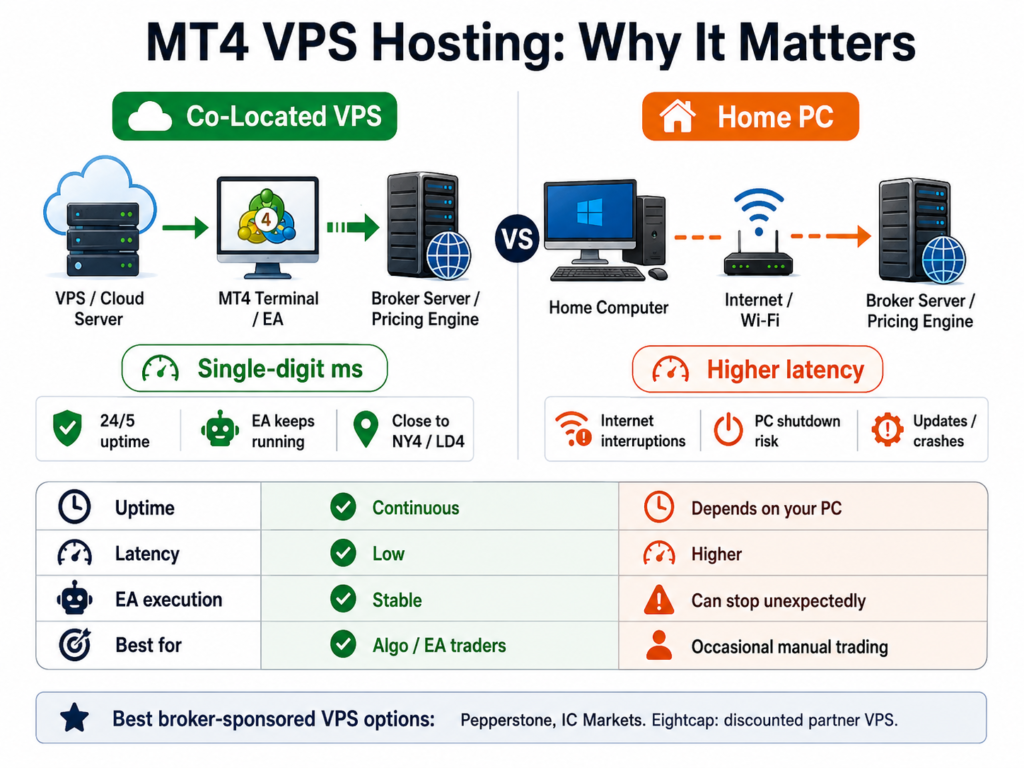
A Virtual Private Server (VPS) is a remote computer that runs your MT4 terminal 24 hours a day, 5 days a week — even when your personal computer is off, asleep, or experiencing power or internet interruption. For EA traders, a VPS is not optional. It’s infrastructure.
Without a VPS:
- Your EA stops executing when your computer shuts down or loses internet connectivity
- Latency between your computer and the broker’s server introduces fill delays
- Windows updates or crashes can interrupt automated strategies at the worst possible moment
With a VPS properly configured for MT4:
- The EA runs continuously, executing precisely according to its logic
- Latency is minimized if the VPS is hosted close to the broker’s server location
- Strategy performance in live trading more closely mirrors backtested results
Broker VPS programs:
Pepperstone and IC Markets both offer free VPS hosting for qualifying accounts — typically accounts above a minimum equity threshold or monthly trading volume. The VPS is co-located near the broker’s pricing engine, reducing latency to single-digit milliseconds. This is meaningfully better than a generic third-party VPS that may be geographically distant from the broker’s server.
Eightcap offers VPS access in partnership with third-party providers at discounted rates for clients.
For traders who don’t qualify for a broker-sponsored free VPS, quality third-party providers include Beeks Financial Cloud, ForexVPS, and commercial providers like AWS and Microsoft Azure with MT4-compatible Windows Server configurations. The critical specification: choose a VPS data center location in the same city or exchange as your broker’s server (typically Equinix NY4 in New York or LD4 in London for most major brokers).
Should you choose MT4 or MT5 for forex trading in 2026?
This is the question most traders ask eventually — and most review sites answer it evasively. Here is a direct verdict:
Choose MT4 if:
- You have an existing EA or indicator library in MQL4 that you don’t want to recode
- You trade exclusively forex and CFDs (MT4’s primary domain)
- Your broker is phasing out MT4 for new clients and you need to move quickly to a broker that maintains it
- You’ve invested significant time learning MT4’s specific interface and workflow
- You want the broadest possible third-party EA marketplace at MQL5.com — MT4 EAs still vastly outnumber MT5 EAs in availability
Choose MT5 if:
- You trade stocks, futures, or commodities alongside forex — MT5 supports more asset classes natively
- You want to write new automated strategies — MQL5 is more powerful, better documented for new development
- You don’t have existing MQL4 tools to maintain
- Your broker has MT5 but is phasing out MT4 (increasingly common)
- You want the more advanced economic calendar, DOM (Depth of Market), and order types native to MT5
The controversial truth: For pure forex trading with an existing EA library, MT4 in 2026 is still the better operational choice — not because the platform is superior, but because the MQL4 ecosystem is richer, more tested, and more transferable across brokers. The brokers worth using all still support MT4 fully. The upgrade to MT5 is an eventual inevitability, not an immediate requirement.
How do you set up MT4 with your chosen forex broker?
Setting up MT4 with a new broker takes less than 30 minutes. Here’s the complete process:
Step 1: Open a live or demo account
Complete the broker’s KYC process — typically name, email, address, government ID, and proof of address. Most top MT4 brokers complete verification within a few hours to one business day.
Step 2: Download MT4
Download MT4 directly from your broker’s website — not from MetaQuotes directly. Broker-specific MT4 builds include the broker’s server addresses pre-configured. Pepperstone’s download includes Smart Trader Tools pre-installed. IC Markets’ includes their server list automatically.
Step 3: Connect to the broker’s server
When MT4 opens, select your broker from the server list (e.g., “PepperstoneMarkets-Live” or “ICMarkets-Live01”). Enter your account number and password provided during registration.
Step 4: Verify connectivity
The bottom status bar should show a green connection icon and real-time tick data within 30 seconds of connecting. If not, check your server selection — brokers often have multiple server addresses for different geographic regions.
Step 5: Install EAs and indicators
EAs (.ex4 or .mq4 files) go in the MT4 data folder at: MetaTrader 4 > MQL4 > Experts. Indicators go in MQL4 > Indicators. After placing files, right-click the relevant folder in MT4’s Navigator panel and click “Refresh.”
Step 6: Set up VPS (for EA traders)
If your broker provides free VPS, activate it via the client portal. Install MT4 on the VPS remote desktop, log in with your account credentials, and activate your EA on the VPS terminal rather than your local machine.
What MT4 broker features matter most for your trading style?
Different trading styles require different MT4 broker configurations. Use this as your decision filter:
For scalpers:
Priority: Raw spread (0.0–0.1 pip EUR/USD), NDD execution, no minimum hold time. → IC Markets, Pepperstone Razor.
For EA/algo traders:
Priority: EA permission, VPS availability, stable server uptime, Smart Trader Tools (Pepperstone). → Pepperstone, IC Markets, Eightcap.
For swing traders:
Priority: Competitive spread (Standard account acceptable), overnight swap rates, robust charting. Standard account at Pepperstone or IC Markets serves well.
For beginners:
Priority: Low minimum deposit, quality education, simple account opening, live chat support. → Pepperstone (no minimum deposit, 24/5 live chat, Smart Trader Tools learning curve support).
For US-based traders:
Priority: NFA/CFTC regulation — no alternative. → OANDA, FOREX.com, tastyfx.
For high-volume traders:
Priority: Volume rebate programs, institutional pricing tiers. → IC Markets (volume-linked pricing), Pepperstone (Active Trader program with rebates from Tier 1 upward).
The right MT4 forex broker doesn’t just provide a platform download. It provides the infrastructure — execution quality, VPS access, EA permissions, and regulatory protection — that determines whether your strategy performs in live trading the way it performed in your backtest.
MT4 has lasted two decades because it works. Find a broker that implements it properly, and you have an execution environment that can serve you for the next decade.
→ See our full IC Markets review to understand why it leads on raw spread MT4 execution.
→ Compare the best regulated forex brokers across all platforms — MT4, MT5, cTrader, and TradingView.
Frequently Asked Questions About Forex MT4 Brokers
Is MetaTrader 4 still supported by brokers in 2026?
Yes — the majority of major regulated forex brokers still fully support MT4 in 2026. While some brokers (notably XTB in 2025) have discontinued MT4 for new clients, the core MT4 brokers — IC Markets, Pepperstone, OANDA, FOREX.com, Eightcap, FP Markets — maintain active MT4 infrastructure with no announced deprecation timeline. MetaQuotes has not announced any end-of-life date for MT4 server licensing.
Can I use the same MT4 EA across different brokers?
Yes — compiled MQL4 EAs (.ex4 files) are portable across any MT4 broker. You copy the .ex4 file to the new broker’s MT4 MQL4/Experts folder and it runs. However, EA performance may vary between brokers due to differences in spread, execution speed, and slippage — always test on demo first before deploying live at a new broker.
What is the difference between MT4 Standard and Raw/ECN accounts?
A Standard MT4 account uses spread-only pricing — all broker costs are embedded in the bid-ask spread (typically 1.0–1.5 pips on EUR/USD). A Raw or ECN account provides near-interbank spreads (as low as 0.0 pips) plus a separate commission per lot ($6–$7 round-trip is typical). For traders placing more than 20 lots per month, the Raw account almost always produces lower total trading costs. Standard accounts suit beginners or low-volume traders who prefer simpler cost transparency.
Do MT4 brokers allow algorithmic trading and Expert Advisors?
All brokers reviewed here explicitly permit Expert Advisors on MT4. Universal prohibitions across brokers include latency arbitrage (exploiting price feed delays) and high-frequency tick scalping that exploits data irregularities. Standard automated strategies — trend-following, mean-reversion, grid, and martingale EAs — are permitted. Always verify your specific EA type with the broker’s compliance team before live deployment to avoid disputes at payout.
Which MT4 broker has the fastest execution speed?
IC Markets and Pepperstone consistently achieve the fastest execution times among retail MT4 brokers, with average fill speeds measured at under 40 milliseconds in independent testing — largely due to co-location of their pricing servers in Equinix NY4 (New York) and LD4 (London) data centers. Execution speed is meaningfully faster on Raw/ECN accounts versus Standard accounts, as NDD routing eliminates dealing desk latency. Third-party latency testing tools can measure actual round-trip execution time from your location to any broker’s MT4 server.
Methodology: This guide is based on publicly available broker data, spread and commission structures verified from official broker websites (June 2026), independent execution quality data from ForexBrokers.com, DayTrading.com, and CompareForexBrokers.com, and community performance reports from Reddit’s r/Forex and r/FundedTrader. All fees and conditions subject to change — verify directly with each broker before opening an account. This content does not constitute financial advice.